
- What is FORM and Why is it Different?
- Installing and Running FORM
- The Julia-FORM Bridge
- Understanding FORM Syntax (The Basics)
Built-in Mathematical Functions & Sums
Symmetry Properties of Functions
Iterative Substitution with
repeat
Conditional Term Selection (
if+count)
Organising Output with
Bracket
The Preprocessor — Metaprogramming with
#do
Tensors and SCHOONSCHIP Notation
Tensor Contractions & The Levi-Civita Tensor
Vector Calculus and Cross Products
Gram Determinants and AutoDeclare
Traces of Dirac Gamma Matrices
Gamma Matrix Algebra in \(D\) Dimensions
Wick's Theorem with
dd_
QCD and Color Algebra (\(SU(N)\))
Exact Rational Arithmetic with
PolyRatFun
Mandelstam Variables and Scattering Kinematics
Generating Optimised Code (
Format O)
A Full QFT Calculation — Compton Scattering
- Why FORM over FeynCalc?
- Conclusion
Symbolic Manipulation in QFT: A Pedestrian's Guide to FORM via Julia
If you've ever tried computing scattering amplitudes in Quantum Field Theory (QFT), you know the pain. You're usually stuck evaluating traces of dozens of Dirac gamma matrices, contracting hundreds of Lorentz indices, and wrangling millions of algebraic terms. Most people naturally reach for general-purpose tools like Mathematica or SymPy, but these systems inevitably choke on memory or grind to a halt when faced with real-world loop computations.
What is FORM and Why is it Different?
That's where FORM comes in. Created by Jos Vermaseren at NIKHEF, it's the modern successor to SCHOONSCHIP (which was one of the very first dedicated high-energy physics programs back in the 60s). FORM isn’t trying to be a general-purpose math environment. It was built from the ground up for one thing: ripping through massive real computations on real computers.
Because it works locally on each term, FORM gives you:
Unmatched Memory Efficiency: Only the active term lives in memory, meaning you can chew through expressions with billions of terms.
Raw Speed: The core operations are deeply optimized for tensor contractions, Dirac algebra, and pattern-matching.
No Auto-Factorization: Factorization requires seeing the whole expression at once, so FORM just doesn't do it. Instead, you guide the grouping using specific bracket commands.
In this post, I'll show you how to tap into FORM's QFT capabilities without leaving the comfort of the Julia programming language.
Installing and Running FORM
If you want to run FORM natively, it's open-source and hosted on GitHub (github.com/vermaseren/form). You can compile it from source on Linux or macOS using the usual GNU build tools:
git clone https://github.com/vermaseren/form.git
cd form
autoreconf -i
./configure
make
sudo make install
Once that's done, you just write your script into a .frm file (like calc.frm) and feed it to the terminal:
form calc.frmFORM will read the file, crunch the algebra, and dump the result to standard output.
The Julia-FORM Bridge
While FORM's syntax is powerful, it's a bit rigid. It's much nicer to orchestrate diagram generation and parse the results inside Julia. To make this seamless, we use the FORM_jll.jl package, which guarantees the form binary is available regardless of your operating system.
(Note: For the code snippets below, we've set up a small evaluate_form wrapper behind the scenes that passes the string to the FORM binary and returns the result.)
Understanding FORM Syntax (The Basics)
Before getting into the physics examples, here's a quick rundown of the FORM syntax you'll see. It’s statement-based, meaning you end every command with a semicolon (;).
Declarations (
Symbols,Vectors,Indices,Functions): FORM needs to know what it's looking at. You have to declare your scalars asSymbols, four-vectors asVectors, spacetime/color indices asIndices, and non-commuting operators asFunctions.Defining Expressions (
Local): TheLocalkeyword tells FORM to evaluate an algebraic expression and store it in memory.Dirac Matrices (
g_): The absolute core of QFT fermion lines.g_(spin_line, index)is FORM's way of writing \(\gamma^\mu\). Sog_(1, m)is the gamma matrix \(\gamma^\mu\) on fermion line 1. Slash momenta are justg_(1, p)for \(\not{p}\).Kronecker Delta / Metric Tensor (
d_): FORM usesd_(m, n)for both the Kronecker delta \(\delta_{mn}\) and the Minkowski metric \(\eta_{\mu\nu}\).Traces (
trace4): Callingtrace4, 1;takes the Dirac trace over all the gamma matrices on fermion line1in 4 dimensions.Contractions (
contract): Just typecontract;to sum over repeated dummy indices (Einstein summation).Pattern Matching (
id): Theidcommand substitutes expressions. For instance,id p.k = s/2;replaces the dot product \(p \cdot k\) with \(s/2\). You can also use wildcards, likeid d_(i?, i?) = N;to replace any contracted index \(i\) with \(N\).Factorization (
Bracket): Since FORM expands everything, you useBracket Ds, Du;to group your terms together based on specific variables (like propagators).Iteration (
repeat ... endrepeat): This block loops its statements over each term until nothing changes anymore. It's the standard way to handle recursive definitions.Sorting & Storage (
.sort,.store):.sortcloses a module, forcing FORM to collect like terms..storesaves the finished expression so you can reuse it in later modules.The Preprocessor (
#do,#define,#include): A C-style macro layer that runs before any algebra happens. It’s great for generating code or looping over diagrams. Variables are injected using backticks, like`i'.Rational Coefficients (
PolyRatFun): This declares a function that tells FORM to keep coefficients as fully-cancelled polynomial fractions rather than expanding the denominators. It's an absolute lifesaver for loop calculations.Conditionals (
if (...) ... endif,Discard): You can branch based on a term's properties (like its powercountin a specific symbol) and just toss the term away usingDiscard.Code Optimisation (
Format O1–O4): This spits out your expression as deeply optimized straight-line code (using Horner schemes and common-subexpression elimination) so you can directly copy-paste it into C or Fortran.Combinatorics (
dd_,distrib_):dd_generates all pairwise contractions of its arguments (perfect for Wick's theorem), anddistrib_distributes arguments across functions.
Alright, let's ramp up from basic math to full QFT scattering amplitudes.
Built-in Mathematical Functions & Sums
Built-in Mathematical Functions & Sums
FORM comes pre-loaded with standard math functions like factorials (fac_), binomial coefficients (binom_), Kronecker deltas (delta_), and arbitrary summations (sum_).
If you just want to sum the Taylor series of \(e^x\) up to \(x^5\), it's as simple as this:
include("form.jl")
using .FormWrapper

math_code = """
    Symbols x, i;
    Local expx = sum_(i, 0, 5, x^i/fac_(i));
"""
println(FormWrapper.evaluate_form(math_code))
   expx =
       + 1
       + x
       + 1/2*x^2
       + 1/6*x^3
       + 1/24*x^4
       + 1/120*x^5
      ;
Symmetry Properties of Functions
Symmetry Properties of Functions
Functions in FORM can be natively declared as symmetric, antisymmetric, cyclic, or rcyclic. FORM automatically sorts their arguments into alphabetical order based on the rules of that symmetry, completely automating the bookkeeping of minus signs and equivalent terms!
To see why this is so powerful, let's look at how FORM handles these four symmetries using real physics examples:
Symmetric (S) \(\to\) The Stress-Energy Tensor
In relativity, the stress-energy tensor is symmetric (\(T^{\mu\nu} = T^{\nu\mu}\)). The momentum flowing in the \(x\)-direction across a \(y\)-surface is identically equal to the momentum flowing in the \(y\)-direction across an \(x\)-surface. If your code generates T(y, x), FORM says, "Ah, \(T\) is symmetric. I prefer alphabetical order, so I will rewrite this as + T(x, y)." This allows FORM to instantly combine T(x,y) + T(y,x) into 2*T(x,y).
Antisymmetric (A) \(\to\) The Faraday Electromagnetic Tensor
The Faraday tensor is totally antisymmetric (\(F_{\mu\nu} = -F_{\nu\mu}\)). If \(F^{xy} = B_z\), then \(F^{yx} = -B_z\). If you input F(y, x), FORM wants it alphabetical. It swaps them to F(x, y), but because it knows \(F\) is antisymmetric, it enforces the physics by spitting out - F(x, y). The Magic Trick: What if your math accidentally produces F(x, x)? FORM knows that swapping \(x\) and \(x\) takes zero swaps, but the antisymmetric rule demands a minus sign. Since \(F^{xx} = -F^{xx}\), it must be \(0\). FORM silently deletes F(x, x) from your calculation entirely! (Physically, there is no self-interacting magnetic field).
Cyclic (C) \(\to\) Quark-Gluon Loops (Color Traces)
Imagine a quark in a circular loop emitting three gluons: Red (\(R\)), Green (\(G\)), and Blue (\(B\)). The math for this is a matrix trace: \(\text{Tr}(T^R T^G T^B)\). Because it's a circle, the starting point doesn't matter. Emitting \(R \to G \to B\) is the exact same physical diagram as starting later and emitting \(G \to B \to R\). However, if it emitted them as \(R \to B \to G\), that is a physically different diagram! You cannot arbitrarily swap two gluons; you can only "rotate" your starting perspective. If you input Trace(G, B, R), FORM is only allowed to rotate it. It rotates \(G\) to the back, leaving Trace(B, R, G). It rotates \(B\) to the back, leaving + Trace(R, G, B). It stops there because \(R\) is alphabetically first.
Reverse Cyclic (R) \(\to\) Loops of Photons
Imagine a closed circular loop of 4 photons: \(A, B, C, D\). Unlike quarks, photons do not carry a "charge direction". This means tracing the loop clockwise (\(A \to B \to C \to D\)) produces the exact same physics amplitude as tracing the loop counter-clockwise (\(A \to D \to C \to B\)). If your diagram generator traces the loop backwards and gives FORM Loop(D, C, B, A), FORM realizes it's a reverse-cyclic function. It flips the whole thing backward to (A, B, C, D) and outputs + Loop(A, B, C, D). Now, FORM can combine the clockwise and counter-clockwise diagrams perfectly!
Here is how all four symmetries look in code when we ask FORM to sort the messy sequence (x2, x3, x4, x1, x5):
sym_code = """
    Symbols x1,x2,x3,x4,x5;
    Functions S(symmetric), A(antisymmetric), C(cyclic), R(rcyclic);
    Local [S] = S(x2,x3,x4,x1,x5);
    Local [A] = A(x2,x3,x4,x1,x5);
    Local [C] = C(x2,x3,x4,x1,x5);
    Local [R] = R(x2,x3,x4,x1,x5);
"""
println(FormWrapper.evaluate_form(sym_code))
   [S] =
       + S(x1,x2,x3,x4,x5)
      ;

   [A] =
       - A(x1,x2,x3,x4,x5)
      ;

   [C] =
       + C(x1,x5,x2,x3,x4)
      ;

   [R] =
       + R(x1,x4,x3,x2,x5)
      ;
Iterative Substitution with repeat
Iterative Substitution with repeat
Whenever you need recursive definitions, a repeat ... endrepeat block is your best friend. It applies the rules inside it over and over until the expression stops changing.
Here is how you'd compute \(5!\) by unfolding \(f(n) = n\,f(n-1)\) down to the base case \(f(0)=1\). We use the built-in pos_ wildcard to ensure it only matches positive integers and stops cleanly:
repeat_code = """
    Symbol n;
    CFunction f;
    Local Fact = f(5);
    repeat;
      id f(n?pos_) = n*f(n-1);
    endrepeat;
    id f(0) = 1;
"""
println(FormWrapper.evaluate_form(repeat_code))
   Fact =
       + 120
      ;
You get exactly \(120\). Wildcard sets like pos_ (positive integers), int_, and symbol_ make the pattern matching incredibly robust.
Conditional Term Selection (if + count)
Conditional Term Selection (if + count)
Filtering out unwanted terms is a breeze with if conditionals. The count function checks the total power of specific symbols in a term. By pairing it with Discard, you can isolate a specific order of expansion.
Watch what happens when we expand \((x+y)^4\) but tell FORM to throw away anything that isn't exactly quadratic in \(x\):
cond_code = """
    Symbols x, y;
    Local P = (x+y)^4;
    if (count(x,1) != 2) Discard;
"""
println(FormWrapper.evaluate_form(cond_code))
   P =
       + 6*x^2*y^2
      ;
We're left with just \(6x^2y^2\). This trick is exactly how you project onto a specific power of a coupling constant in perturbation theory.
Organising Output with Bracket
Organising Output with Bracket
FORM refuses to factorize expressions automatically because of the memory overhead. Instead, you use Bracket to force structure onto the final output. It pulls your chosen variables outside the parentheses and groups the remaining coefficients together.
bracket_code = """
    Symbols a, b, x;
    Local E = a*x^2 + b*x^2 + a*x + 7*x;
    Bracket x;
"""
println(FormWrapper.evaluate_form(bracket_code))
   E =

       + x * (
          + 7
          + a
          )

       + x^2 * (
          + b
          + a
          );
It beautifully collects the expression in powers of \(x\): \(x\,(7+a) + x^2\,(a+b)\). In real calculations, you'll use this constantly to bracket on propagator denominators or coupling constants so you can actually read the result.
The Preprocessor — Metaprogramming with #do
The Preprocessor — Metaprogramming with #do
Before FORM even touches the algebra, it runs a C-style preprocessor. This lets you programmatically generate huge blocks of expressions. Using the backtick-quote syntax `i', you can inject the current value of a loop variable.
Here’s a quick #do loop that physically writes out a geometric series before evaluation:
prepro_code = """
    Symbol x;
    Local Geom = 0
    #do i=1,5
       + x^`i'
    #enddo
    ;
"""
println(FormWrapper.evaluate_form(prepro_code))
   Geom =
       + x
       + x^2
       + x^3
       + x^4
       + x^5
      ;
In a serious project, you use this exact mechanism to loop over hundreds of auto-generated Feynman diagrams.
Tensors and SCHOONSCHIP Notation
Tensors and SCHOONSCHIP Notation
FORM strictly distinguishes between Vectors, Indices, and Tensors (or CTensors for commuting components). It also uses the incredibly elegant SCHOONSCHIP notation: whenever an index is summed over and happens to be the argument of a vector, the vector itself replaces the index!
Because of this, \(\sum_i u_i v_i\) just instantly becomes the dot product \(u \cdot v\).
tensor_code = """
    Vectors u,v;
    Indices i,j;
    Function f;
    Index k=0;

    Local dot = u(i) * v(i);
    Local schoonschip = f(i,j) * u(i) * v(j);

* Overruling contraction using dimension 0
    Local nocontract = u(k) * v(k);

    contract;
"""
println(FormWrapper.evaluate_form(tensor_code))
   dot =
       + u.v
      ;

   schoonschip =
       + f(u,v)
      ;

   nocontract =
       + u(k)*v(k)
      ;
(Notice how setting the dimension of an index to 0 prevents FORM from contracting it if you want to keep the explicit summation.)
Tensor Contractions & The Levi-Civita Tensor
Tensor Contractions & The Levi-Civita Tensor
Antisymmetric tensors like \(\epsilon_{\mu\nu\rho\sigma}\) show up everywhere in physics. Contracting two of them in 4 dimensions is a classic exercise that gives you \(4! = 24\). FORM does this in its sleep.
\[ \epsilon_{\mu\nu\rho\sigma}\epsilon^{\mu\nu\rho\sigma} = 24 \]form_code = """
Dimension 4;
Indices m,n,r,s;
Local result = e_(m,n,r,s) * e_(m,n,r,s);
contract;
"""
println(FormWrapper.evaluate_form(form_code))
   result =
       + 24
      ;
Vector Calculus and Cross Products
Vector Calculus and Cross Products
Because we have the Levi-Civita tensor e_, 3D vector calculus is trivial. We can compute a double cross product \(\vec{u} \times (\vec{v} \times \vec{w})\) and instantly recover the famous "BAC-CAB" identity rule.
cross_code = """
    Dimension 3;
    Vectors u,v,w;
    Indices i,j,k,m,n;

* Cross product definition using Levi-Civita
    Local [ux(vxw)] = e_(i,j,k) * u(i) * (e_(m,n,j) * v(m) * w(n));
    contract;
"""
println(FormWrapper.evaluate_form(cross_code))
   [ux(vxw)] =
       + v(k)*u.w
       - w(k)*u.v
      ;
Gram Determinants and AutoDeclare
Gram Determinants and AutoDeclare
If you need determinants, FORM is unmatched. You compute the Gram determinant of \(n\) vectors simply by squaring the Levi-Civita tensor. To give you an idea of the speed, the expanded Gram determinant for 10 vectors has \(3,628,800\) terms, and FORM chews through it in minutes.
To keep things readable, we'll do 3 vectors. We can use AutoDeclare to tell FORM that anything starting with v is a vector, and use the ... operator to generate the sequence:
gram_code = """
    AutoDeclare Vector v;
    Local G3 = e_(v1,...,v3)^2;
    contract;
"""
println(FormWrapper.evaluate_form(gram_code))
   G3 =
       + v1.v1*v2.v2*v3.v3
       - v1.v1*v2.v3^2
       + 2*v1.v2*v1.v3*v2.v3
       - v1.v2^2*v3.v3
       - v1.v3^2*v2.v2
      ;
Traces of Dirac Gamma Matrices
Traces of Dirac Gamma Matrices
Alright, let's get into the QFT bread and butter: Dirac algebra. Evaluating a standard trace of four gamma matrices:
\[ \text{Tr}(\gamma^\mu \gamma^\nu \gamma^\rho \gamma^\sigma) = 4 (\eta^{\mu\nu}\eta^{\rho\sigma} - \eta^{\mu\rho}\eta^{\nu\sigma} + \eta^{\mu\sigma}\eta^{\nu\rho}) \]trace_code = """
Dimension 4;
Indices m,n,r,s;
Local QEDtrace = g_(1, m) * g_(1, n) * g_(1, r) * g_(1, s);
trace4, 1;
"""
println(FormWrapper.evaluate_form(trace_code))
   QEDtrace =
       + 4*d_(m,n)*d_(r,s)
       - 4*d_(m,r)*d_(n,s)
       + 4*d_(m,s)*d_(n,r)
      ;
Gamma Matrix Algebra in \(D\) Dimensions
Gamma Matrix Algebra in \(D\) Dimensions
When you're doing dimensional regularization, you have to work in \(D = 4 - 2\epsilon\) spacetime dimensions. That means the standard contraction identities become dependent on \(D\):
\[ \gamma^\mu \gamma_\mu = D\,\mathbf{1}, \qquad \gamma^\mu \gamma^\alpha \gamma_\mu = (2-D)\,\gamma^\alpha, \qquad \gamma^\mu \gamma^\alpha \gamma^\beta \gamma_\mu = 4\,\eta^{\alpha\beta}\mathbf{1} - (4-D)\,\gamma^\alpha\gamma^\beta \]We can handle this symbolically by declaring D as a Symbol and setting Dimension D;.
gamma_code = """
    Symbols D;
    Dimension D;
    Indices m, a;
    Local C1 = g_(1, m) * g_(1, m);
    Local C2 = g_(1, m) * g_(1, a) * g_(1, m) * g_(1, a);
    trace4, 1;
"""
println(FormWrapper.evaluate_form(gamma_code))
   C1 =
       + 4*D
      ;

   C2 =
       + 8*D
       - 4*D^2
      ;
FORM evaluates \(\texttt{C1}\) to \(4D\), and \(\texttt{C2}\) to \(8D - 4D^2\), which perfectly matches the theoretical expectations once you take the trace.
Wick's Theorem with dd_
Wick's Theorem with dd_
For combinatorial headaches like Wick's theorem, FORM gives us the dd_ function. It generates all pairwise contractions of its arguments instantly. For a free field, the 4-point function is just the sum over all possible ways to pair the fields into propagators:
wick_code = """
    Vectors p1, p2, p3, p4;
    Local Wick4 = dd_(p1, p2, p3, p4);
"""
println(FormWrapper.evaluate_form(wick_code))
   Wick4 =
       + p1.p2*p3.p4
       + p1.p3*p2.p4
       + p1.p4*p2.p3
      ;
It spits out the three possible pairings without missing a beat. If you hand it \(2n\) fields, it generates all \((2n-1)!!\) contractions automatically.
QCD and Color Algebra (\(SU(N)\))
QCD and Color Algebra (\(SU(N)\))
If you're working in QCD, you'll constantly be taking traces over \(SU(3)\) color matrices to find factors like \(C_F\):
\[ \sum_a \left(T^a T^a\right)_{ij} = C_F \delta_{ij} \implies \text{Tr}(T^a T^a) = C_F \text{Tr}(\mathbf{1}) = C_F N \]We can derive \(C_F = \frac{N^2 - 1}{2N}\) natively using the \(SU(N)\) Fierz identity and non-commutative functions:
qcd_code = """
    Symbols N, CF, TR;
    Dimension N;
    Indices a, b, c, i, j, k, l;

    Functions T;

    Local ColorTrace = T(a, i, j) * T(a, j, i);
    Local ColorFactor = ColorTrace * N^-1;

    id T(a?, i?, j?) * T(a?, k?, l?) = TR * ( d_(i,l)*d_(j,k) - d_(i,j)*d_(k,l)*N^-1 );

    contract;

    id TR = 1/2;
"""
println(FormWrapper.evaluate_form(qcd_code))
   ColorTrace =
       - 1/2
       + 1/2*N^2
      ;

   ColorFactor =
       - 1/2*N^-1
       + 1/2*N
      ;
Exact Rational Arithmetic with PolyRatFun
Exact Rational Arithmetic with PolyRatFun
Normally, FORM aggressively flattens everything into a giant sum, which is a nightmare if you're dealing with denominators. By declaring a function as PolyRatFun, you force FORM to keep coefficients as fully-cancelled polynomial fractions. This is critical for handling rational functions of \(D\) in loop integrals.
poly_code = """
    Symbol x;
    CFunction rat;
    PolyRatFun rat;
    Local F = rat(1, x) + rat(1, 1+x);
"""
println(FormWrapper.evaluate_form(poly_code))
   F =
       + rat(2*x + 1,x^2 + x)
      ;
FORM smartly combines the fractions, finding the common denominator and reducing it to \(\dfrac{2x+1}{x^2+x}\).
Mandelstam Variables and Scattering Kinematics
Mandelstam Variables and Scattering Kinematics
Let's plug some real kinematics into the mix. For Bhabha scattering (\(e^+ e^- \to e^+ e^-\)), after evaluating traces we substitute the Mandelstam invariants. Ignoring the electron mass, \(s+t+u=0\).
\[ s = (p+k)^2, \quad t = (p-p')^2, \quad u = (p-k')^2 \]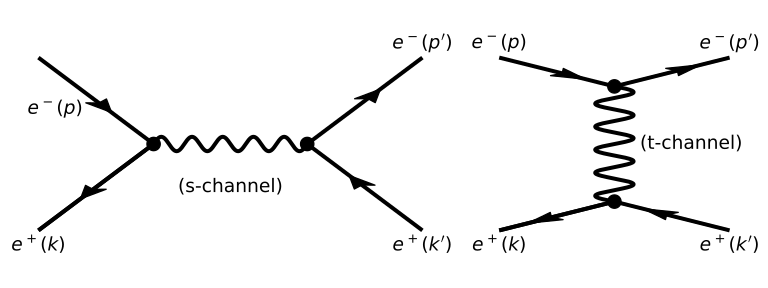
mandelstam_code = """
    Dimension 4;
    Vectors p, k, pp, kp;
    Indices m, n;
    Symbols s, t, u;

    Local M2 = g_(1, m) * g_(1, p) * g_(1, n) * g_(1, k)
             * g_(2, m) * g_(2, pp)* g_(2, n) * g_(2, kp);

    trace4, 1;
    trace4, 2;
    contract;

    id p.p = 0;
    id k.k = 0;
    id pp.pp = 0;
    id kp.kp = 0;

    id p.k = s/2;
    id pp.kp = s/2;
    id p.pp = -t/2;
    id k.kp = -t/2;
    id p.kp = -u/2;
    id k.pp = -u/2;
"""
println(FormWrapper.evaluate_form(mandelstam_code))
   M2 =
       + 8*u^2
       + 8*t^2
      ;
Generating Optimised Code (Format O)
Generating Optimised Code (Format O)
This is arguably one of FORM's most underrated features. It can take a messy symbolic output and rewrite it as numerically optimised C or Fortran code (applying Horner schemes and common-subexpression elimination). This bridges the gap between doing the math and actually running Monte Carlo integrations.
opt_code = """
    Symbols a, b, c;
    Local F = (a+b+c)^3;
    .sort
    Format O2;
"""
println(FormWrapper.evaluate_form(opt_code))
Z1_=c^2;
Z2_=3*c + b;
Z2_=b*Z2_;
Z2_=3*Z1_ + Z2_;
Z2_=b*Z2_;
Z3_=2*c + b;
Z3_=b*Z3_;
Z1_=Z1_ + Z3_;
Z3_=c + b;
Z3_=3*Z3_ + a;
Z3_=a*Z3_;
Z1_=3*Z1_ + Z3_;
Z1_=a*Z1_;
Z3_=c^3;
F=Z1_ + Z3_ + Z2_;
Instead of handing you a giant expanded polynomial, FORM defines a chain of temporary Z variables that aggressively reuse intermediate values, drastically cutting down CPU cycles when evaluated.
A Full QFT Calculation — Compton Scattering
A Full QFT Calculation — Compton Scattering
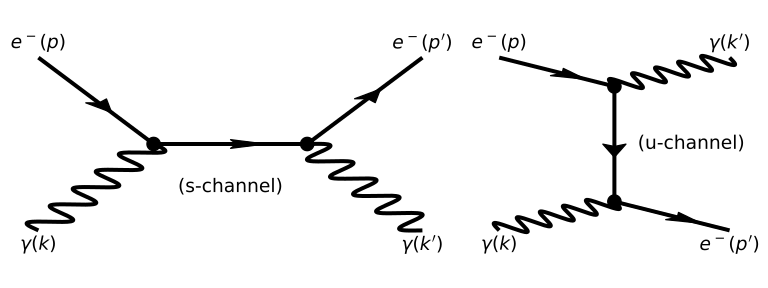
To wrap things up, let's compute the unpolarized squared matrix element for Compton Scattering (\(e^-(p) + \gamma(k) \to e^-(p') + \gamma(k')\)).
The scattering amplitude \(\mathcal{M}\) is the sum of the \(s\)-channel and \(u\)-channel Feynman diagrams:
If you do this by hand, you'll fill pages with trace theorems trying not to drop a factor of 2, just to reach the Klein-Nishina result:
\[ \frac{1}{4} \sum_{\text{spins}} |\mathcal{M}|^2 = 2e^4 \left[ \frac{p \cdot k'}{p \cdot k} + \frac{p \cdot k}{p \cdot k'} + 2m^2 \left( \frac{1}{p \cdot k} - \frac{1}{p \cdot k'} \right) + m^4 \left( \frac{1}{p \cdot k} - \frac{1}{p \cdot k'} \right)^2 \right] \]Let FORM handle it:
compton_code = """
    Dimension 4;
    Vectors p, k, pp, kp;
    Indices mu, nu;
    Symbols m, pdotk, pdotkp;

    Local M2 =
      (g_(1,pp) + m) * (
           g_(1,mu) * (g_(1,p) + g_(1,k) + m) * g_(1,nu) * pdotk^-1 * 2^-1
         + g_(1,nu) * (g_(1,p) - g_(1,kp) + m) * g_(1,mu) * pdotkp^-1 * (-2)^-1
      )
      * (g_(1,p) + m) * (
           g_(1,nu) * (g_(1,p) + g_(1,k) + m) * g_(1,mu) * pdotk^-1 * 2^-1
         + g_(1,mu) * (g_(1,p) - g_(1,kp) + m) * g_(1,nu) * pdotkp^-1 * (-2)^-1
      );

    trace4, 1;
    contract;

    id p.p = m^2;
    id pp.pp = m^2;
    id k.k = 0;
    id kp.kp = 0;

    id p.k = pdotk;
    id pp.kp = pdotk;
    id p.kp = pdotkp;
    id k.pp = pdotkp;

    id p.pp = pdotk - pdotkp + m^2;
    id k.kp = pdotk - pdotkp;

    Multiply 4^-1;

    Bracket pdotk, pdotkp;
"""

println(FormWrapper.evaluate_form(compton_code))
   M2 =

       + pdotk^-2 * (
          + 2*m^4
          )

       + pdotk^-1*pdotkp^-1 * (
          - 4*m^4
          )

       + pdotk^-1 * (
          + 4*m^2
          )

       + pdotk^-1*pdotkp * (
          + 2
          )

       + pdotkp^-2 * (
          + 2*m^4
          )

       + pdotkp^-1 * (
          - 4*m^2
          )

       + pdotk*pdotkp^-1 * (
          + 2
          );
Because we told FORM to bracket on the dot products, the output maps perfectly to the textbook result. The \(2m^4 \left( \frac{1}{p\cdot k} - \frac{1}{p\cdot k'} \right)^2\) term expands precisely into the coefficients FORM prints natively. You literally just type in the Feynman rules, hit run, and the physics drops out.
Why FORM over FeynCalc?
If you've spent any time doing QFT, you've probably used FeynCalc. So why bother learning FORM? It completely comes down to scale:
The Memory Model: FeynCalc runs inside Mathematica, meaning it stores the entire expression as a single object. FORM processes terms sequentially. If you hit a calculation with a billion terms, FeynCalc will crash your computer; FORM will just chew through it.
Brute Speed: FORM’s pattern matcher and tensor algebra engines are hand-optimized C. For heavy multi-loop traces, it is aggressively faster than any general-purpose system, and it parallelizes cleanly via
tform.Research-Grade Scaling: The cutting-edge multi-loop results you see in physics literature are computed with FORM. FeynCalc is fantastic for one-loop checks and pedagogical work, but it stalls out right where FORM is getting started.
Direct Export: As shown above, FORM exports highly optimized C/Fortran natively, creating a smooth pipeline from symbolic math to numerical simulation.
Obviously, FeynCalc wins on usability—it sits happily inside a graphical Mathematica notebook. But by bridging FORM with Julia, as we've done here, you get the best of both worlds. You can use Julia's lovely syntax to orchestrate the generation and plotting, and offload the brutal algebraic lifting to FORM.
Conclusion
FORM isn't just an archaic tool; it is a hyper-optimized engine that outpaces modern algebra systems for the specific mathematical structures of Particle Physics. By calling it seamlessly from Julia, we get the best of both worlds: Julia's modern package management and flow control, and FORM's raw power for the QFT heavy lifting.